Overview of VOD and live streaming platforms
An overview and comparison of solutions for video on demand and live streaming — from standalone players and comprehensive SaaS platforms to open-source media servers that need to be configured and operated independently.
An overview and comparison of solutions for delivering video on demand (VOD) and live streaming — from standalone players and comprehensive SaaS platforms to open-source media servers that need to be configured and operated independently.
Solutions reviewed
INSYS
Website: insysvideotechnologies.com
The company describes its product as a comprehensive solution for recording, VOD, and live recording of audio and video. However, the description is purely marketing-oriented, and there is no technical documentation or examples of deployed solutions, so it is difficult to verify what they actually deliver. They apparently built a platform for mojeekino.pl, but the part I can see consists only of recordings of interviews with directors played through the open-source Video.js player. It would probably be necessary to speak with them directly to find out what they actually offer; the website provides very few technical details.
Video.js
Website: videojs.com
Video.js is only a player, although a fairly advanced one that uses current web technologies. Features such as adapting the stream quality to the available connection or supporting live streaming require a server that supports the appropriate protocols.
Plyr
Website: plyr.io
Plyr is also only a player. At first glance, its functionality seems similar to Video.js, but it is more focused on playing video and events from platforms such as YouTube and Vimeo. Its developer community is smaller than Video.js's, so I did not investigate it in as much detail.
JW Player
Website: www.jwplayer.com
JW Player is a complete VOD and live streaming platform: a player combined with the server-side services needed for transcoding, storing, and broadcasting video. That is what their website materials claim. They are more detailed than the information available from INSYS, but not technical enough to verify whether the advertised capabilities are being overstated.
The platform also offers more interesting options, such as streaming simultaneously to your own website, Facebook, YouTube, and Twitch, as well as embedding Google advertisements. This could be useful for free performances.
Flowplayer
Website: flowplayer.com
A platform similar to JW Player, but with a smaller feature set.
Vimeo
Website: vimeo.com
Vimeo is a SaaS platform aimed at video creators. It can also be used as a video platform similar to JW Player, although it would be necessary to verify whether the integration can be as flexible as with a dedicated video platform, or whether VOD users would need to have Vimeo accounts.
Wowza
Website: www.wowza.com
Wowza is primarily focused on live streaming large events. The JW Player and Vimeo materials contain a lot of information about uploading and publishing videos, but describe the operation of live streaming rather vaguely. Wowza is the opposite: it provides extensive documentation on delivering live streams, from a semi-professional setup using OBS to integrations with professional studio equipment. However, its VOD capabilities are represented by little more than an enigmatic marketing video. I ultimately received more documentation from Wowza, and VOD also appears to be fully achievable on the platform.
The player itself gave me the worst experience of all the solutions reviewed here, at least judging by the videos it serves on its own website. Before the video loads, the player appears to have frozen. It also frequently stutters on slower connections, as if automatic quality adjustment were working very slowly.
On the other hand, we know that streamonline.tv used this system for a long time and handled substantial traffic with it.
Open-source media servers
I initially looked for open-source solutions that could provide the server infrastructure required by Video.js, but did not find anything particularly compelling:
- Red5 — a few years ago, many people used it for custom video streaming solutions. Unfortunately, the open-source version supports only the obsolete RTMP protocol, while HLS and DASH are available in the Pro version from 109 USD per server.
- Ant Media — a similar situation: modern protocols supported by browsers without plugins are available in the Enterprise version from 49 USD per server.
- NGINX — we already use NGINX for HTTP routing between services and for serving static dashboard and POS files. It turns out that NGINX supports serving MP4 files through the HLS protocol, and there is also a tutorial on broadcasting a live stream with OBS.
It would be necessary to investigate which gaps these components fill on the server side. They certainly do not provide everything out of the box that a platform such as JW Player offers.
Feature comparison
Legend: ✅ yes / full support · ⚠️ partial support or requires additional work · ❌ no · ❓ no information / needs verification.
Video on demand
| Feature | INSYS | Video.js | JW Player | Flowplayer | Vimeo | Wowza |
|---|---|---|---|---|---|---|
| Ready-made tool for transcoding files into codecs / containers supported by the player or media server | ❓ | ❌ supported formats are listed, but the tool has to be selected and configured separately | ✅ claims to convert almost any file into the appropriate formats | ❌ source videos must be transcoded according to their guidelines before being uploaded to their server | ✅ ❓ they mention a dedicated tool, but I did not verify its exact capabilities | ✅ a transcoder is available through the API, but it supports a moderate range of formats; static files must use the MP4 or FLV container |
| Video player that can be embedded on your own website | ❓ | ✅ | ✅ | ✅ | ✅ | ⚠️ their own player is being discontinued and they recommend using Video.js, so the features below are provided by that player together with their media servers |
| Start playback from the beginning of the stream | ❓ | ✅ | ✅ | ✅ | ✅ | ✅ |
| Start playback from any point in time | ❓ | ✅ | ✅ | ✅ | ✅ | ✅ |
| Ability to select stream quality | ❓ | ⚠️ there is client-side support, but the server must support HLS or DASH | ✅ | ✅ | ✅ | ✅ |
| Automatic adaptation of quality to the user's connection | ❓ | ⚠️ as above — requires HLS or DASH on the server side | ✅ full HLS and DASH support from their media servers | ✅ full HLS and DASH support from their media servers | ✅ the technical implementation is not described, but it is probably also based on HLS or DASH | ✅ HLS, DASH, or Microsoft Smooth Streaming |
| Stream protection using a token or username and password | ❓ | ❌ this is strictly a server-side feature, so the player does not provide it | ✅ | ❓ | ⚠️ available, but the documentation suggests that the user must have an account and go through their payment system; this would need verification | ✅ |
| Protection against repeated use of a token or login | ❓ | ❌ as above — this is a server-side feature | ❌ they have encrypted tokens, but no way to include the user's IP address or another user identifier; they suggested combining their service with InPlayer, which provides ready-made paywalls, but I doubt that blocking at this level would be resistant to circumvention | ❓ | ❓ | ✅ an encrypted token can contain the user's IP address |
Live streaming
| Feature | INSYS | Video.js | JW Player | Flowplayer | Vimeo | Wowza |
|---|---|---|---|---|---|---|
| Ready-made tool for broadcasting a live stream | ❓ | ❌ it is only a player | ✅ supposedly available, although they do not show how it works | ✅ supposedly available, although they do not show how it works | ✅ they claim to provide it, but on YouTube there are apparently videos using a third-party encoder directly with RTMP output | ✅ documented integration methods for many tools and types of studio equipment |
| Delivering the live stream to the player | ❓ | ⚠️ there is client-side support, but the server must support HLS or DASH | ✅ | ✅ | ✅ | ✅ |
| Ability to start watching a live stream from an earlier point | ❓ | ❓ | ✅ probably, since the features below are supported | ❓ | ❓ | ✅ probably, since the features below are supported |
| Retaining the stream after it ends for VOD playback | ❓ | ❌ this is strictly a server-side feature | ✅ | ❓ | ❓ | ✅ |
Licenses and subscriptions
- INSYS — ❓ no information available.
- Video.js — ✅ open source.
- JW Player — ❓ VOD functionality apparently starts at 10 USD per month, but the plan includes only 500 GB of transfer, which could be consumed by a single popular performance. Prices for higher plans were not provided.
- Flowplayer — ❓ VOD functionality apparently starts at 100 USD per month, but includes only 600 GB, so the situation is similar to JW Player.
- Vimeo — ❓ they apparently limit the amount of stored video rather than its transfer, which sounds unusually favourable and requires verification: 170 PLN per month for 5 TB of video storage for VOD, or 245 PLN per month for 7 TB with live streaming support.
- Wowza — ❓ plans start at 100 USD for up to 20 hours of live streaming and approximately 1000 hours of viewing. As shown by these limits, the offer targets large live events; there was no information about plans focused more on VOD.
Could we build our own solution?
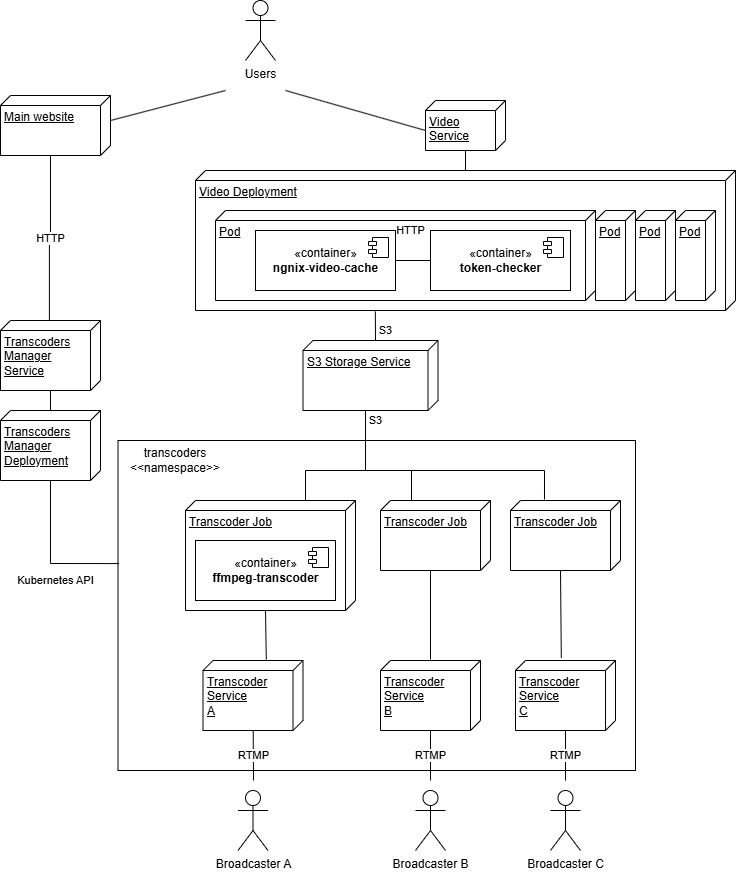
Full architecture for live streaming and VOD
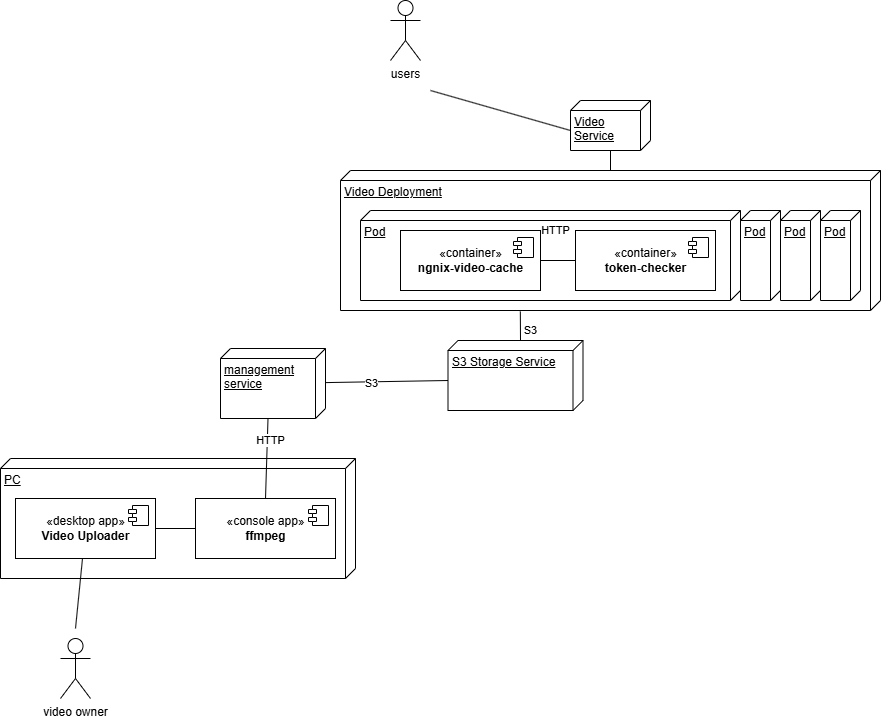
Reduced architecture for VOD only
Assessing ffmpeg's capabilities
Traditionally, ffmpeg was mainly used to convert audio and video files from one format to another. As widely supported standards for serving video streams to browsers emerged, it also gained the ability to convert individual video files into many small files — chunks and a playlist — compatible with the HLS standard. These files are ready to be served to a browser; they only need to be uploaded to an FTP server, something we already practise in the instructions for our simple VOD solution.
Interestingly, the command-line program can also work as a single-threaded RTMP server and convert a stream received from OBS directly into HLS files. It continuously updates the playlist files, so Video.js can be connected to it to display the live stream — with some delay, of course. ffmpeg can also be configured to upload the output directly to a server instead of saving it to the local filesystem. This is controlled by its method parameter, described in the HLS documentation.
Assessing NGINX's capabilities
We already have experience using NGINX as a proxy cache. It can also connect to an external service that decides whether a request should be rejected, which makes implementing access-token handling straightforward. NGINX can read data from S3.